When a page appears under “Crawled – currently not indexed” in Google Search Console, the first assumption is usually content quality.
Maybe the page is too thin.
Maybe Google thinks it is duplicated.
Maybe internal linking is weak.
But there is another cause that is often overlooked: Google may not be rendering the page the same way your users see it.
In one recent case, a page was fully functional in the browser but remained excluded from Google’s index because critical content depended on CSS and JavaScript rendering.
The page had useful content. It had been published correctly. Visitors opening it in a normal browser could see and use it.
Google could not.
Its rendered version contained the page header, but the primary content remained unavailable.
After we identified and repaired the rendering problem, requested reindexing, and allowed Google to process the corrected page, the URL entered the index.
The content did not need to be rewritten.
The rendering needed to be fixed.
The Direct Answer: The Page Was Not Indexed Because Google Could Not Render Its Content
In this case, the “Crawled – currently not indexed” status was caused by a rendering failure.
Google reached the URL successfully. There was no robots block, noindex directive, server failure, or crawl error preventing access.
But when Google rendered the page, it saw only part of the interface. The main content remained hidden because the CSS and JavaScript did not produce the same final page state that users saw in their browsers.
The diagnosis was confirmed through the before-and-after sequence:
- The page appeared complete in a normal browser.
- Google Search Console showed an incomplete rendered page.
- The CSS and rendering behavior were corrected.
- Google rendered the page correctly.
- The page was indexed after reprocessing.
That sequence matters.
We are not guessing that rendering might have caused the problem. In this particular case, the rendering problem was identified, repaired, and followed by successful indexing.
This is also where the distinction between performing an SEO audit and actually solving an SEO problem becomes important.
An SEO specialist can discover that Google is not seeing the page correctly.
But identifying the symptom does not automatically provide the technical ability to repair the CSS, JavaScript, template logic, page builder behavior, caching layer, or server configuration causing it.
The problem began in Google Search Console.
The solution required web development.
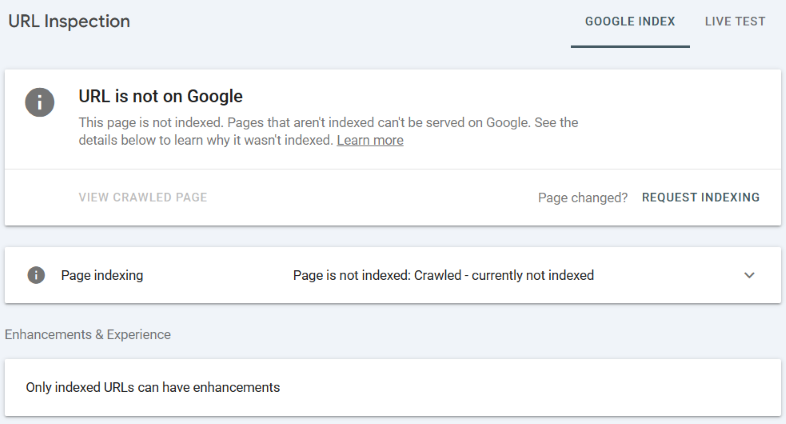
What “Crawled – Currently Not Indexed” Actually Means
This status means Google:
- Found the page.
- Crawled the URL successfully.
- Did not add the page to its search index.
Unlike “Discovered – currently not indexed,” Google has already visited the URL.
Google’s official description is deliberately broad: the page was crawled but not indexed, and it may or may not be indexed later. The status itself does not identify the underlying cause. Google Search Console Page Indexing report
That means “Crawled – currently not indexed” is a status, not a complete diagnosis.
Possible causes can include:
- Duplicate or substantially similar content.
- Weak or incomplete content.
- Canonicalization problems.
- Soft 404 interpretation.
- Poor internal discovery and site architecture.
- Rendering failures.
- Missing resources.
- Technical conditions that prevent Google from receiving the full page.
In our case, the cause was not theoretical. Google’s own rendered version showed that the primary content was missing.
The problem occurred after Google reached the URL, during the process through which Google rendered and interpreted the page.
Crawling the URL Is Not the Same as Seeing the Page
A successful crawl does not prove that Google received the same page your visitors received.
Google’s process involves more than downloading the initial HTML response.
Google renders pages and runs JavaScript using a recent version of Chrome because many websites depend on JavaScript to bring content into the page. Without successful rendering, Google may not see content that exists only after scripts execute. How Google Search works
A modern webpage may initially deliver:
- A header.
- A navigation menu.
- Empty content containers.
- Loading placeholders.
- CSS files.
- JavaScript files.
- Instructions for retrieving or revealing the rest of the page.
The browser then has to complete the process.
JavaScript may load content, modify the page structure, remove hidden states, add CSS classes, initialize components, or retrieve information from another source.
For users, this can happen so quickly that the page appears complete from the beginning.
But technically, the first version delivered by the server and the final version visible in the browser may be very different documents.
If Google’s rendering process does not reach that final state, Google may crawl the URL successfully while receiving only a fraction of the content.
That is what happened here.
Why CSS and JavaScript Can Trigger This Issue
Modern websites increasingly rely on JavaScript for rendering.
Examples include:
- Revealing content after page load.
- Loading sections dynamically.
- Adding CSS classes through JavaScript.
- Showing content only after interactions.
- Building layouts client-side.
- Activating animations that change visibility.
- Retrieving page content through external requests.
- Initializing page-builder modules after the document loads.
This approach can work well for visitors because browsers execute JavaScript and apply the resulting CSS changes immediately.
However, Google’s rendering process does not always reproduce the exact same final experience.
Google acknowledges that JavaScript-powered websites can experience search-related rendering problems and provides dedicated guidance for finding JavaScript issues that block pages or specific content from appearing in Search. Fix Search-related JavaScript problems
The problem does not have to be a dramatic website failure.
The page does not need to show an error message.
It may look completely normal to the website owner, designer, content strategist, and client.
A single visibility rule can be enough.
For example, a section may begin in a hidden state and depend on JavaScript to reveal it. If the script does not execute as expected in Google’s rendering environment, the content remains hidden.
The visitor sees the complete article.
Google sees a header and an apparently empty page.
How We Identified the Problem
The page initially appeared completely normal in the browser.
There were:
- No crawl errors.
- No indexing blocks.
- No robots issues.
- No server problems.
- No visible malfunction for ordinary users.
From the perspective of someone opening the URL in Chrome, the page worked.
But testing only in a normal browser would have missed the actual problem.
We tested the page through:
Google Search Console → URL Inspection → Test Live URL → View Tested Page
Google’s URL Inspection tool allows site owners to test a live URL and view a rendered screenshot showing how Google’s inspection system sees the page. URL Inspection Tool
The rendered result looked different from the browser version.
Google rendered only part of the interface while important page content remained unavailable.
That was the turning point.
Browser version
The browser displayed the complete page.

Google-rendered version
Google rendered the header, but the main content was missing.
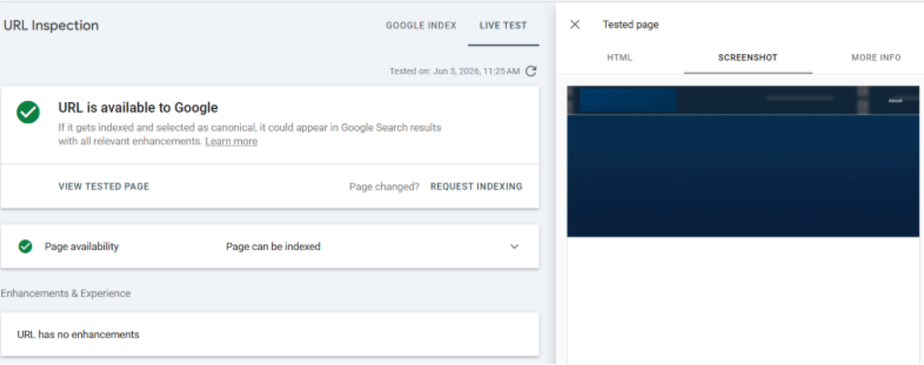
At that point, the issue became clear: Google was not evaluating the same page users were seeing.
The SEO problem could not be solved by changing the title, adding internal links, expanding the copy, or rewriting the article.
The page already had content.
Google could not render it.
The Root Cause
The page relied on JavaScript to change the page state and reveal content controlled through CSS.
Without the final rendering step, sections remained hidden or incomplete.
For users, everything worked because their browsers executed the necessary JavaScript and applied the expected CSS state.
But Google’s rendered output did not consistently reach that same final state.
As a result:
- Google crawled the page
- Google rendered only part of the page
- Google saw limited visible content
- The page remained “Crawled – currently not indexed”
The issue was not that Google refused to visit the URL.
The issue was not that the author had failed to produce useful content.
The issue was not that the SEO team had selected the wrong keyword.
The delivery mechanism prevented Google from seeing what had already been created.
The Fix
Instead of depending entirely on JavaScript to display important content, the rendering approach was adjusted.
Key improvements included:
- Making critical content available directly in the initial page output.
- Reducing dependency on JavaScript for content visibility.
- Ensuring CSS provided a usable default state.
- Preventing primary content from remaining hidden when a script did not complete.
- Using progressive enhancement instead of making basic page visibility dependent on JavaScript.
- Testing the corrected page through Google Search Console rather than relying only on a browser test.
Google’s Web Rendering Service needs access to rendering-critical resources. Google warns that when those resources cannot be fetched, it may have difficulty extracting page content and allowing the page to rank. Google Search Central: Crawling resources
After deploying the changes, we tested the URL again.
Google could now render the page correctly.
We requested reindexing.
The page entered Google’s index.
What This Case Proves, and What It Does Not
This case does not prove that every page under “Crawled – currently not indexed” has a CSS or JavaScript problem.
The Search Console status can have several causes.
It does prove something narrower and more useful:
A page can contain valuable, indexable content and still remain outside Google’s index because the technical rendering layer prevents Google from seeing that content.
It also proves that content quality cannot be assessed independently from content delivery.
To a writer, the page contained a complete article.
To a designer, the page looked correct.
To a visitor, the page worked.
To Google, the page contained little more than a header.
All four observations were accurate from the perspective of the person or system observing the page.
But only one of those perspectives determined whether the page could enter Google’s index.
SEO Is Not Divorced From Web Development
SEO is often treated as a marketing activity performed after the website has been built.
The content strategist chooses topics.
The writer creates the article.
The SEO specialist selects the keyword, title, headings, internal links, and metadata.
The designer makes the page look appropriate.
The developer publishes it.
That division looks orderly on a project plan.
In practice, the borders are not so clean.
Search visibility depends on the interaction between:
- Content
- Information architecture.
- HTML.
- CSS.
- JavaScript.
- Server responses.
- Rendering.
- Internal links.
- Canonical signals.
- Website performance.
- Mobile presentation.
- Security and access rules.
- Analytics and Search Console data.
A failure in one layer can neutralize the work completed in all the others.
The author can produce the best article in the industry.
The SEO strategist can map the correct entities and search intent.
The designer can create an excellent reading experience.
But if the content remains hidden during Google’s render, none of that work produces organic visibility.
This is why technical web development is not merely a production service that happens after the marketing strategy has been completed.
It is part of the marketing system.
The Real Advantage of Keeping SEO and Development on the Same Team
When SEO and development are handled by separate providers, technical problems often become handoff problems.
The SEO agency reports that Google cannot see the content.
The developer replies that the page works in the browser.
The designer points out that the layout looks correct.
The content team confirms that the article is complete.
Each party has evidence supporting its own conclusion.
The conversation can quickly shift from solving the problem to assigning responsibility.
- “The content must be weak.”
- “Google simply has not updated the index.”
- “The developer says the page works.”
- “The SEO tool must be showing an inaccurate screenshot.”
- “This is outside our scope.”
- “Someone else needs to investigate it.”
The client becomes the messenger between specialists who use different tools, different vocabulary, and different definitions of a functioning page.
When the SEO and development functions belong to the same team, the operational question changes.
It is no longer:
Who is responsible for the failure?
It becomes:
Who on the team has the skills needed to reproduce, diagnose, and repair it?
The SEO specialist can identify the indexing discrepancy.
The developer can inspect the rendering behavior.
The content strategist can verify that the page contains sufficient substantive material.
The technical team can change the implementation.
The SEO specialist can test the corrected render.
The same team remains responsible until Google can see the page correctly.
That is more than convenient project management.
It reduces the distance between diagnosis and repair.
Why a Full-Service Digital Marketing Agency Matters
“Full service” is often presented as a long list of things an agency can sell.
- Web design.
- Development.
- SEO.
- Content.
- Paid advertising.
- Conversion optimization.
- Analytics.
That is not the strongest reason to choose a full-service agency.
The stronger reason is that digital marketing problems rarely respect departmental boundaries.
An indexing problem may begin in Search Console and end in a CSS file.
A paid campaign problem may appear to be poor targeting but originate in a broken form or a slow landing page.
A conversion problem may appear to be weak copy but come from mobile layout instability.
A content problem may actually be an information-architecture problem.
A traffic decline may begin with malware, an incorrect canonical, a plugin update, a server configuration, or a failed redirect.
You do not necessarily need every digital marketing service operating at maximum intensity every month.
You need access to the relevant disciplines when the problem crosses from one area into another.
That is the practical meaning of full service:
No commercially important problem should be allowed to fall into the space between vendors.
A designer alone may not diagnose a rendering-indexing problem.
A content strategist may not be able to inspect JavaScript execution.
An advertising manager may see declining campaign results without understanding that the landing page form fails under certain conditions.
An SEO auditor may identify the technical symptom but lack the development access or expertise required to repair it.
The individual specialist may be competent.
The weakness is in the fragmented system.
Small Technical Details Can Create Large Marketing Failures
The CSS issue in this case looked small when viewed as a code-level detail.
From a marketing perspective, it was decisive.
Because the content remained unavailable to Google:
- The page could not enter the index.
- It could not rank for its target searches.
- It could not attract organic visitors.
- It could not pass meaningful internal authority through the intended search journey.
- The time spent researching and writing the article could not produce a search return.
- The page could not contribute to the website’s broader topical coverage.
One rendering defect disabled the commercial value of several completed services.
| Work Already Completed | Why It Could Not Produce Its Intended Result |
|---|---|
| Topic and keyword research | The page could not rank while it remained outside the index. |
| Content strategy | Google could not evaluate the complete content. |
| Copywriting | The article existed, but the rendered version did not expose it. |
| Page design | The browser experience did not match Google’s rendered experience. |
| Internal linking | Links inside unavailable content could not perform their intended function. |
| SEO implementation | Metadata alone could not compensate for missing primary content. |
| Marketing reporting | Performance data could not reflect a page that Google had not indexed. |
This is why details matter.
Not because every technical imperfection will destroy a marketing campaign, but because some seemingly small details control whether the entire system functions.
A Practical Diagnostic Process
When a page remains under “Crawled – currently not indexed,” content quality should be investigated, but it should not be assumed to be the cause.
A disciplined investigation should compare:
1. What the user sees
Open the page in a normal browser and confirm that the content, navigation, links, and page elements appear correctly.
2. What Google sees
Use Google Search Console → URL Inspection → Test Live URL → View Tested Page. Compare the Google-rendered screenshot with the browser version.
3. What appears in the rendered HTML
Search the rendered HTML for a distinctive sentence from the page’s main content. This helps distinguish between content that is completely absent and content that exists but remains visually hidden.
4. Which resources loaded
Review whether the required CSS, JavaScript, images, and other rendering resources were available.
5. What technical condition controls visibility
Determine whether the page relies on a JavaScript-generated class, a hidden CSS state, a page-builder animation, a delayed script, a dynamic content request, a caching layer, a third-party dependency, or another condition that must complete before the content appears.
6. Whether the repair changed Google’s render
After making the correction, repeat the live test. Do not treat the repair as complete merely because the page still works in your own browser. The objective is to make the content available to both visitors and Google.
7. Whether the corrected page enters the index
Request indexing after the meaningful change and monitor the URL. In our case, the page was indexed after Google received the corrected rendered version.
Final Thoughts
When investigating “Crawled – currently not indexed,” do not focus only on content quality.
If your page depends heavily on CSS and JavaScript for rendering, Google may crawl it successfully while still failing to interpret the final experience users receive.
Before assuming the page needs more content, compare:
- What users see in the browser.
- Google’s Live URL Test.
- The rendered screenshot.
- The rendered HTML.
- The resources required to produce the complete page.
- The indexed result after the repair.
Sometimes the problem is not that Google did not crawl the page.
Sometimes Google simply did not see the page the way users did.
And when that happens, the solution will not come from one isolated marketing discipline.
The SEO specialist may find the evidence.
The developer may identify the mechanism.
The content strategist may confirm that the page itself is substantial.
The technical team may implement the repair.
The SEO specialist may verify the result.
Proper digital marketing depends on all of them working toward the same outcome.
That is why SEO and technical web development should not operate as disconnected departments.
And it is why a capable full-service digital marketing agency is not valuable merely because it offers more services.
It is valuable because when an important page disappears between the cracks, there is still one team responsible for finding it, fixing it, and confirming that the entire system works.
Frequently Asked Questions
Can CSS cause a page to remain “Crawled – currently not indexed”?
Yes. In this case, CSS and JavaScript controlled whether the primary content became visible in the rendered page. Google crawled the URL but rendered only part of it. After the rendering behavior was repaired, the page was indexed.
This does not mean CSS causes every instance of the status. It means CSS and rendering should be investigated when Google’s tested page differs from the browser version.
Why did the page work for users but not for Google?
The users’ browsers completed the JavaScript and CSS state changes required to reveal the content. Google’s rendering process did not produce the same final state, so the primary content remained unavailable in Google’s rendered version.
Would rewriting the content have solved the problem?
No. The page already contained the necessary content. Rewriting or expanding it would not have repaired the rendering mechanism that prevented Google from seeing it.
Can an SEO audit identify this problem?
Yes. Google Search Console and the URL Inspection tool can reveal the difference between the browser version and Google’s rendered version.
However, diagnosing the cause and implementing the repair may require CSS, JavaScript, WordPress, page-builder, caching, or server-level development expertise.
Why is an integrated agency better suited to this type of problem?
Because the issue crosses departmental boundaries. SEO discovers the indexing problem, while development investigates and repairs the rendering mechanism. When both functions belong to the same team, the work can move directly from evidence to diagnosis, implementation, retesting, and confirmation.
Do You Need the Indexing Problem Diagnosed, or Actually Fixed?
An important page can remain outside Google’s index even when its content, design, and SEO settings appear correct.
The cause may sit inside CSS, JavaScript, a WordPress template, a page builder, caching, server configuration, or the interaction between several of them.
WebMaxFormance combines technical SEO, web development, content strategy, performance optimization, and ongoing website support within one team.
That means the problem does not get passed from vendor to vendor.
It gets investigated until the website works as a complete marketing system.